Syncing Jobs with LimeStaff
What is Job Syncing?
Job syncing is the process of importing and updating job listings from your Loxo account into your WordPress website using the LimeStaff plugin. This ensures your website always displays the latest job opportunities available in your Loxo system.
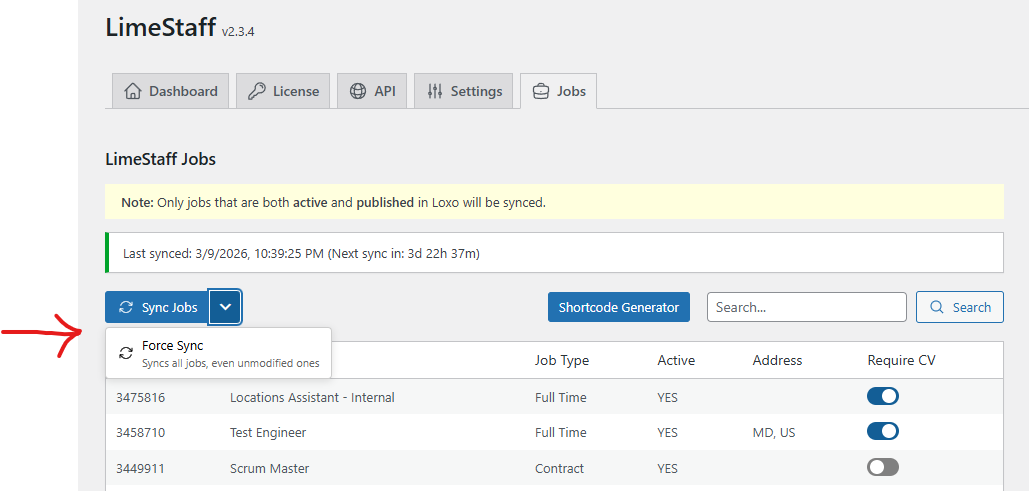
How to Sync Jobs
Auomatic Sync: You do not need to do anything for regular updates – jobs will appear and update on your site as long as your API credentials are set up correctly.
Manual Sync
If you want to force a sync (for example, after making changes in Loxo):
- Go to the LimeStaff plugin settings in your WordPress admin area – you can find this in Settings → LimeStaff.
- Navigate to the Jobs tab.
- Look for the “Sync Jobs” button.
- Click the button to start syncing jobs immediately.
- Wait a few moments for the process to complete. You can refresh your job board page to see the updates.
Important: Job Status in Loxo
- Only jobs that are BOTH Active and Published in Loxo will sync to your website.
- Jobs that are inactive, unpublished, or archived in Loxo will not appear on your website.
- How to publish a job in Loxo:
You may also use this helper plugin to bulk publish/unpublish Loxo jobs: Bulk Loxo Job Publisher (requires LimeStaff). Then go to Tools -> Bulk Loxo Publisher.
Troubleshooting
Job not appearing
- Double-check the job’s status in Loxo (must be both Active and Published).
- Make sure your API credentials are correct in the LimeStaff settings.
- Try running a manual sync as described above.
Old jobs not removed
- Jobs removed or unpublished in Loxo will be removed from your website during the next sync.
Still having issues?
Please contact us for help: Contact Us