How to Strip Loxo Job Styles
Stripping Loxo Job Styles for Consistent Branding
When you embed Loxo jobs into your WordPress site, you might notice that the job descriptions don’t quite match your site’s aesthetic. This is because Loxo job listings often come with pre-packaged inline styles. These hardcoded styles (like specific fonts, colors, or padding) frequently conflict with your WordPress theme’s global styling, leading to a fragmented user experience.
By stripping these inline styles, you give your website’s CSS full control over how job listings appear. This ensures that every job post looks like a native part of your brand rather than an external plug-in.
Why Enable “Strip Inline Styles”?
-
Brand Consistency: Maintain uniform typography and color schemes across your entire site.
-
Cleaner Code: Removes bloated HTML attributes that can interfere with responsive design.
-
Easier Maintenance: Update your site’s look once in your theme settings without having to manually “fix” job descriptions.
How to Enable This Feature
Ready to clean up your job board? Follow these simple steps:
-
Log in to your WordPress Admin Dashboard.
-
Navigate to the LimeStaff menu in the sidebar.
-
Click on Settings.
-
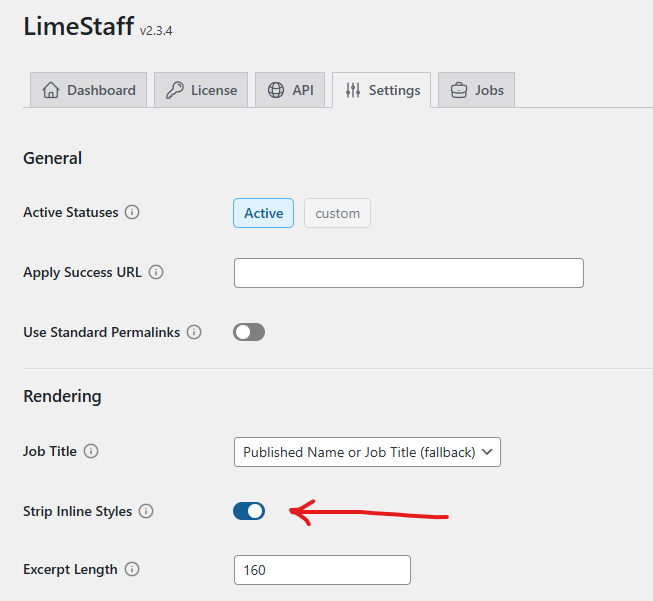
Locate the toggle or checkbox labeled Strip Inline Styles.
-
Enable the setting and click Save Changes.
Pro Tip: Once enabled, your jobs will automatically inherit the $CSS$ rules defined by your WordPress theme. If a job description looks a bit too plain afterward, you can style the standard HTML tags (like
h3,p, andul) directly in your theme’s Customizer.